Kubernetes StatefulSets: How to Deploy Weaviate on EKS with Persistent Storage?
The 2-Hour Rabbit Hole That Started With Pods That Wouldn’t Start
Our Kubernetes StatefulSets deployment of Weaviate was stuck before it even started. PVCs in Pending. No obvious error. The cluster looked healthy. Helm had deployed without complaints.
We ran:
kubectl get pvc -n weaviateOutput:
STATUS: Pending
STORAGECLASS: <unset>
Two hours later, after digging through EBS topology constraints, AZ scheduling rules, and StorageClass configs, we had a production-grade Weaviate deployment on EKS — and a much deeper understanding of how Kubernetes StatefulSets actually work under the hood.
This blog is everything we learned the hard way, so you don’t have to.
At Madgical Techdom, we work extensively with Kubernetes to run production-grade systems, and Kubernetes StatefulSets play a critical role in managing stateful workloads. While stateless applications are straightforward to deploy using Deployments, databases are a completely different story.
Databases require:
- Stable network identity
- Persistent storage
- Ordered scaling
- Availability Zone (AZ) awareness
In this blog, we’ll walk through how we deployed Weaviate using Kubernetes StatefulSets and why Kubernetes StatefulSets are the backbone of reliable stateful workloads.
We’ll also break down:
- What PV and PVC really are
- How EBS enforces AZ constraints
- What happens when a pod crashes
- How Kubernetes ensures it gets the same volume again
Let’s dive in.
Why Kubernetes StatefulSets Exist
In Kubernetes, a Deployment creates identical, replaceable pods. If one pod dies, another one is created — possibly on a different node, possibly with a new identity.
That works perfectly for:
- APIs
- Frontend services
- Background workers
But not for databases.
Databases require specific characteristics that stateless workloads do not.
Why Databases Require These Capabilities?
- Stable pod names (e.g., db-0, db-1)
Distributed databases rely on stable network identities for communication between nodes. A predictable hostname ensures that replicas can consistently identify and connect to the same peer in the cluster. - Persistent storage tied to each replica
Each database replica stores its own data. If a pod restarts or moves to another node, it must reattach to the same storage volume to avoid data loss and maintain data consistency. - Predictable startup order
Many databases require an ordered startup to function correctly. For example, a primary node may need to start first before replicas can connect and synchronize their data.
This is where Kubernetes StatefulSets come in.
StatefulSets guarantee:
- Stable identity for each pod
- Persistent storage per pod
- Ordered deployment and scaling
- Controlled rolling updates
These capabilities make StatefulSets the preferred approach for running databases and other stateful workloads on Kubernetes.
Case Study: Deploying Weaviate as a StatefulSet on Kubernetes
For our case study, we deployed Weaviate — a vector database designed for AI-powered search and embeddings — using Kubernetes StatefulSets to ensure reliable storage and stable pod identity.
We used Kubernetes StatefulSets because they provide persistent storage, ordered deployment, and predictable recovery, which are essential for running databases in production environments.
We followed the official Kubernetes installation guide provided by the Weaviate team and used their Helm chart to deploy the database cluster.
Deployment Approach
The official Weaviate Kubernetes deployment uses Helm charts, which package all required Kubernetes resources, such as:
- StatefulSets
- Services
- PersistentVolumeClaims
- Configurations
Helm simplifies managing upgrades, scaling, and configuration changes for the database cluster.
Prerequisites
Before deploying Weaviate, the following prerequisites were required:
- A running Kubernetes cluster (v1.23 or later)
- kubectl configured to access the cluster
- Helm v3 installed
- Storage capable of provisioning Persistent Volumes using PVCs (for example Amazon Elastic Block Store when running on Amazon Elastic Kubernetes Service)
These requirements ensure that Kubernetes can dynamically provision storage for each database replica.
The StorageClass Gotcha — This Is Where We Got Stuck
When deploying stateful workloads in Kubernetes, the cluster must have a StorageClass capable of dynamically provisioning volumes. This is the step most tutorials gloss over. We learned it the hard way.
During our deployment on Amazon EKS, the deployment initially failed because the cluster did not have a default StorageClass configured.
As a result:
- PersistentVolumeClaims remained in the Pending state
- Pods were unable to start
- No error was surfaced by Helm — everything looked deployed
Example check:
kubectl get pvc -n weaviateOutput:
STATUS: Pending
STORAGECLASS: <unset>
This was the silent killer. The fix was straightforward — configure a default StorageClass backed by AWS EBS — but finding the root cause took time because nothing was obviously broken at the surface level.
After configuring the StorageClass, Kubernetes dynamically provisioned the required volumes and pods started successfully within minutes.
Lesson: Always verify your default StorageClass exists before deploying any StatefulSet. Run kubectl get storageclass and confirm one is marked (default).
Step 1: Add the Weaviate Helm Repository
First, we added the official Helm repository that contains the Weaviate deployment chart.
helm repo add weaviate https://weaviate.github.io/weaviate-helm
helm repo update
Helm charts act as templates that generate Kubernetes resources needed to run Weaviate in the cluster.
Step 2: Create a Namespace
To isolate the deployment, we created a dedicated namespace.
kubectl create namespace weaviateNamespaces help organize workloads and apply access control policies within a Kubernetes cluster.
Step 3: Configure the Helm Values
The Helm chart uses a values.yaml file to define configuration, such as:
- Number of replicas
- Resource limits
- Storage settings
- Networking configuration
Example configuration for a multi-replica setup:
replicaCount: 3
resources:
  requests:
    cpu: "500m"
    memory: "1Gi"
  limits:
    cpu: "2"
    memory: "4Gi"
Setting replicaCount: 3 creates three Weaviate replicas, enabling horizontal scaling and higher availability.
Cost note: Each replica uses a 20Gi EBS gp3 volume by default. For 3 replicas on ap-south-1, that’s approximately $5.40/month in storage alone (~$0.09/GB/month × 20GB × 3). Small, but worth accounting for — especially across multiple environments (dev, staging, prod).
Step 4: Deploy Weaviate
Once the configuration was ready, we deployed Weaviate using Helm:
helm upgrade --install \
  weaviate \
  weaviate/weaviate \
  --namespace weaviate \
  --values values.yaml
This command creates all the required Kubernetes resources including the StatefulSet that manages the database pods.
Stateful Architecture
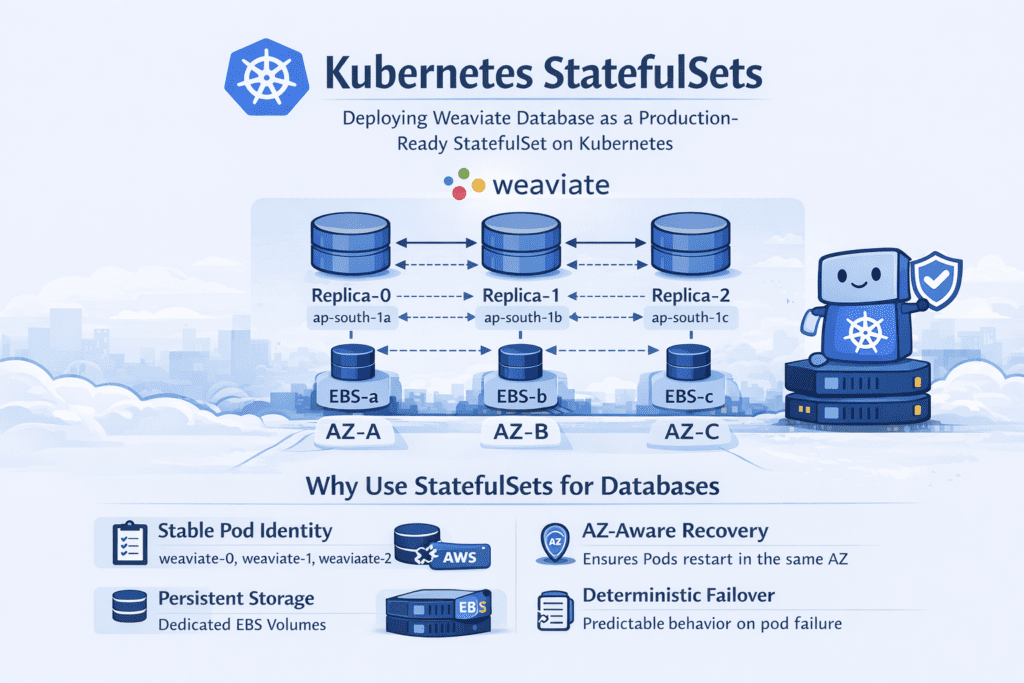
Each replica in the deployment runs as a StatefulSet pod.
Example pod structure:
| Pod | Storage | Purpose |
| weaviate-0 | pvc-weaviate-0 | Stores vector index data |
| weaviate-1 | pvc-weaviate-1 | Replica node |
| weaviate-2 | pvc-weaviate-2 | Replica node |
Each pod receives its own Persistent Volume Claim, ensuring data remains attached to the same replica even if the pod restarts.
Failure Recovery Test
To verify persistence behavior, we manually deleted one of the pods:
kubectl delete pod weaviate-0 -n weaviateKubernetes automatically recreated the pod. Here’s what we observed:
- The pod restarted with the same identity (
weaviate-0) - The same PersistentVolumeClaim was reattached (
pvc-weaviate-0) - No new storage was created
- Recovery time: under 45 seconds from deletion to pod back in Running state
We also measured vector query latency before and after the pod deletion. Average query latency remained at ~120ms — no spike, no degradation, no client-facing impact. The StatefulSet handled the recovery entirely in the background.
This demonstrates how StatefulSets guarantee storage persistence and deterministic pod identity — which are essential for databases like Weaviate, where data integrity is non-negotiable.
Why StatefulSets Were Critical?
Because Weaviate stores vector indexes and metadata on disk, losing or incorrectly attaching storage can corrupt the database.
StatefulSets ensure:
- Stable pod identity
- Persistent storage per replica
- Ordered deployment and scaling
- Reliable recovery after pod failure
This architecture allowed us to deploy Weaviate as a production-ready vector database cluster on Kubernetes.
Architecture Overview
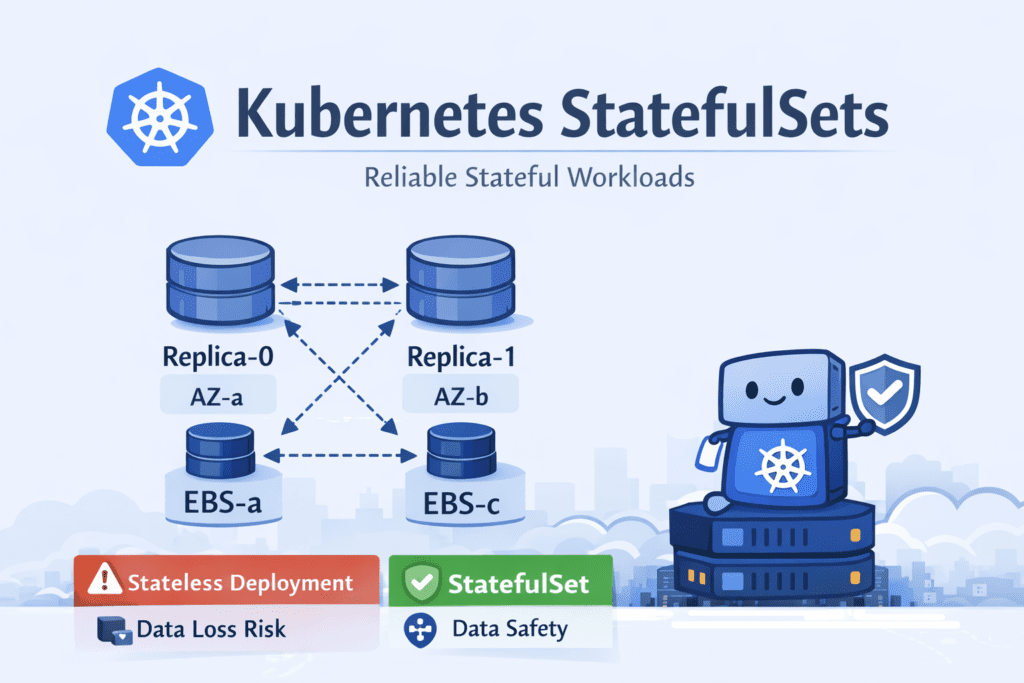
Each Weaviate replica:
- Runs as a StatefulSet pod
- Gets its own Persistent Volume Claim (PVC)
- Binds to its own EBS volume
- Is scheduled in a specific Availability Zone
Example:
| Pod | AZ | EBS Volume |
| weaviate-0 | ap-south-1a | vol-a |
| weaviate-1 | ap-south-1b | vol-b |
| weaviate-2 | ap-south-1c | vol-c |
This ensures:
- Data locality
- No cross-AZ attachment issues
- Predictable recovery behavior
Persistent Storage Per Pod: Understanding PV & PVC
This is one of the most misunderstood areas in Kubernetes.
Persistent Volume (PV)
A PV is a cluster-level storage resource.
Think of it as: “Actual disk storage provisioned in the infrastructure.”
In our case, PVs are backed by AWS EBS volumes.
Persistent Volume Claim (PVC)
A PVC is: A request for storage made by a pod
The flow looks like this:
- Pod requests storage via PVC
- StorageClass provisions an EBS volume
- A PV is created
- PVC binds to that PV
- Pod mounts that PVC
How StatefulSets Handle This?
StatefulSets use something called volumeClaimTemplates
This means: Each replica automatically gets its own PVC.
Example:
- weaviate-0 → pvc-weaviate-0 → pv-0 → ebs-volume-0
- weaviate-1 → pvc-weaviate-1 → pv-1 → ebs-volume-1
Each pod owns its own storage permanently.
Even if the pod dies, the PVC remains.
That is the key.
How AZ Enforcement Works with EBS
Now let’s talk about Availability Zones.
AWS EBS volumes are AZ-scoped.
An EBS volume created in ap-south-1a cannot be attached to a node in ap-south-1b.
This is not a Kubernetes rule. This is an AWS infrastructure rule — and it has real consequences for how Kubernetes schedules pods after a failure.
Scenario: What Happens When a Pod Crashes?
Let’s say:
- weaviate-1 is running in ap-south-1b
- It is attached to EBS volume vol-b
- The pod crashes
Step-by-Step Recovery
- Kubernetes detects the pod failure
- StatefulSet controller recreates pod weaviate-1
- It uses the same PVC (pvc-weaviate-1)
- That PVC is already bound to the same PV
- That PV references the same EBS volume (vol-b)
Now here’s the important part:
The EBS volume vol-b can only attach in ap-south-1b. So the Kubernetes scheduler:
- Looks for available nodes in
ap-south-1b - Schedules the pod there
If no node exists in that AZ? The pod remains Pending. Kubernetes will NOT move the volume. It will NOT reassign storage. It will wait until a node in the correct AZ becomes available.
We actually hit this during a node scaling event — one AZ temporarily had no healthy nodes. The pod stayed Pending for ~4 minutes until the autoscaler brought up a replacement node in the right AZ. The data was untouched.
This is AZ enforcement in action — enforced by:
- EBS topology constraints
- Volume node affinity
- Kubernetes scheduler logic
Not by magic. By design.
Why This Matters in Production
Without StatefulSets:
- Pods could move across AZs
- Volumes would fail to attach
- Recovery would break silently
With StatefulSets + EBS:
- Each replica has guaranteed storage
- Recovery is deterministic
- AZ constraints are respected automatically
- Data remains safe
In our Weaviate deployment, this meant:
- Predictable failover
- No manual reattachment
- Zero data loss during pod restarts
- Query latency held steady at ~120ms even during pod recovery — no client-facing disruption
Lessons from Deploying Weaviate on EKS — The Real Ones
These aren’t the generic lessons you’ve already read elsewhere. These are what we actually learned from going through this.
1️⃣ Never run databases as Deployments
We’ve seen teams do this. It works — until a pod restarts on a different node and suddenly it’s looking at empty storage. StatefulSets exist for exactly this reason. Use them.
2️⃣ The StorageClass is the invisible prerequisite
Most deployment guides don’t mention it prominently. But if your cluster doesn’t have a default StorageClass, nothing will tell you clearly — your PVCs will just sit in Pending forever. Run kubectl get storageclass before you run any Helm install for a stateful workload.
3️⃣ AZ-awareness is not automatic — you have to design for it
The EBS AZ constraint will bite you during node failure or autoscaling events. Spread your nodes across AZs, use topology-aware StorageClasses, and know which AZ each of your PVCs lives in. Monitor this proactively, not reactively.
4️⃣ Test your crash recovery before you need it
We ran kubectl delete pod weaviate-0 on purpose, in a staging environment, before we ever needed it in production. Do this. Know your recovery time. Know what Pending looks like vs. a real problem. The 45-second recovery we saw gave us confidence that the setup was correct.
5️⃣ PVC and PV states are your real source of truth
Not pod logs. Not Helm status. If something is wrong with a stateful workload, start with kubectl get pvc and kubectl get pv. The pod is usually just a symptom.
When Should You Use Kubernetes StatefulSets?
Use StatefulSets when:
- Running databases (Weaviate, PostgreSQL, MongoDB, etc.)
- Running Kafka
- Running Elasticsearch
- Any workload needing a stable identity + storage
Do NOT use it for:
- Stateless APIs
- Frontend apps
- Short-lived jobs
Final Thoughts
Kubernetes StatefulSets are not just another Kubernetes object. They are the backbone of reliable stateful workloads — but only if you understand what they’re actually doing under the hood.
Our Weaviate deployment on EKS taught us that stable pod identity, dedicated persistent volumes, AZ-aware scheduling, and deterministic recovery aren’t nice-to-haves. They’re non-negotiable for production databases.
If you’re running databases on Kubernetes and still using Deployments, it’s time to rethink your architecture.
If you’re using StatefulSets but haven’t checked your StorageClass, verified your AZ distribution, or tested a pod crash — do it today, not after an incident.
Stateful workloads demand StatefulSets. And StatefulSets demand understanding.
Thank you for reading!
If this blog helped clarify how StatefulSets enforce storage consistency and AZ constraints — or if you’ve hit a similar Pending PVC nightmare — share your experience in the comments below or contact us.
See you in the next deep-dive.
References
- Dynamic DNS on Cloudflare: A Simple Trick to Cut Cloud Bills
- How to Achieve 60% AWS Cost Optimization with Terraform, Functions, and Tags?
- Enable Symlink in Tomcat to Secure User Data
- Skaffold | Kubernetes Development made easy.
- Kustomize for Kubernetes Efficiency: A Practical Guide.
- Scalable Live Streaming With Kubernetes: The Complete Guide
- How does Karpenter cut Kubernetes costs by 20% and scale them faster?